> ## Documentation Index
> Fetch the complete documentation index at: https://docs.replo.app/llms.txt
> Use this file to discover all available pages before exploring further.
# Welcome to Replo
> Launch, grow, and scale any business on the internet with Replo.
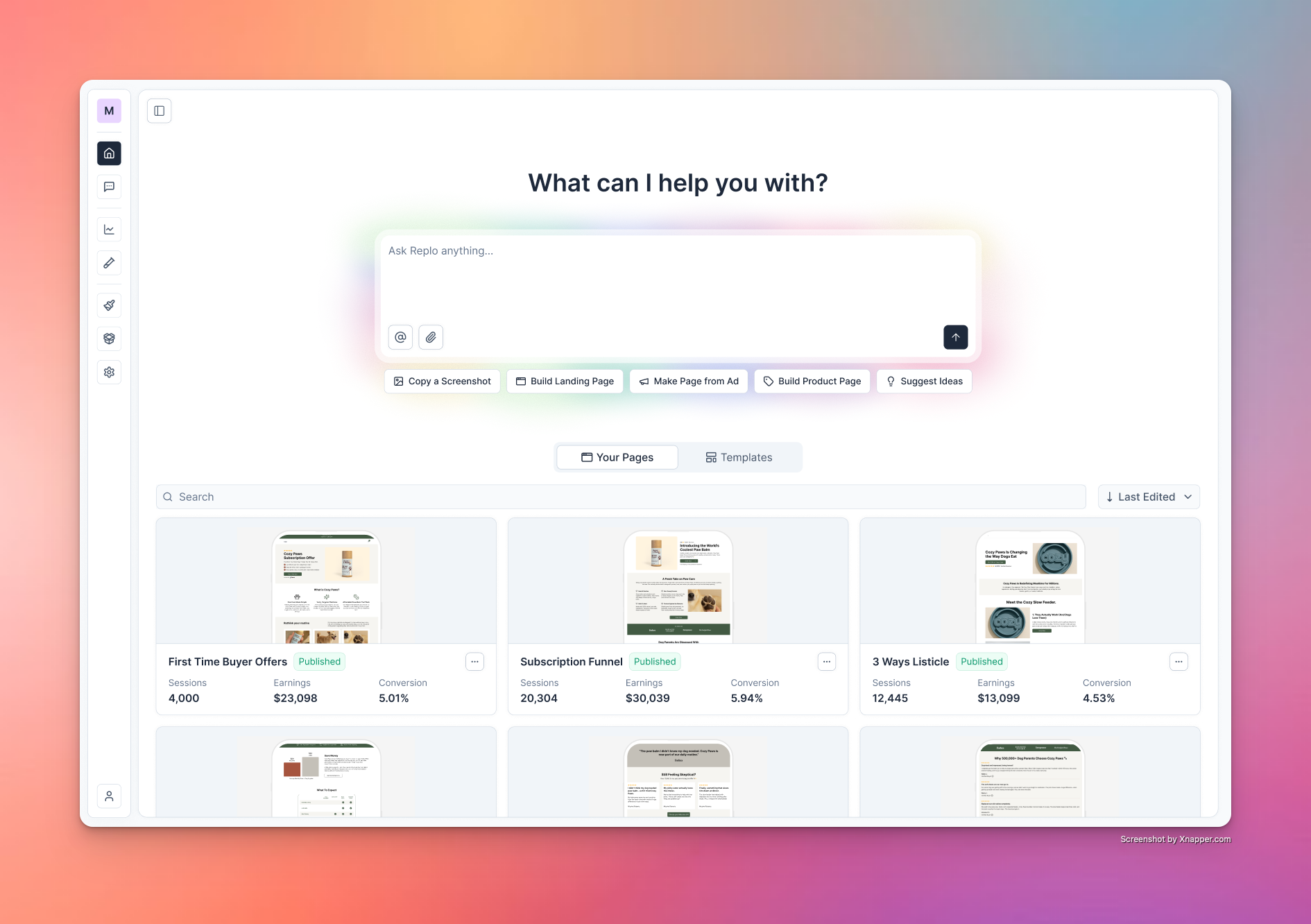 You can use Replo to build your entire sales funnel, or just a single page
of your online business. You can create products, build funnels, and more
directly in Replo, and host them on your own domain or a `reploshops.com`
domain for free.
If you have an existing Shopify store you use for your ecommerce business,
you can add [Replo's Shopify integration](https://apps.shopify.com/alchemy)
to import your products and also automatically redirect users back to your
Shopify Checkout.
Adding Replo's Shopify integration allows you to use the Classic Replo
Builder and publish landing pages, Shopify sections, Shopify product
templates, etc directly to your Shopify theme. If you'd like to read more
about this, you can find our documentation for the [Shopify Landing Page
Builder here](https://support.replo.app).
# Getting Started
Go to [Replo Dashboard](https://dashboard.replo.app) and create an account.
Use your work email to keep shops organized by your team and manage access.
Fill out details about your business, including the name and what you're
selling. This will help us personalize your experience.
In the prompt box, describe the first page you want to build (e.g., "a
product launch landing page with hero and reviews"). Replo's AI will start
building your page immediately, or ask you for more information if it needs
it.
See the [Quickstart guide](/getting-started/quickstart) for detailed
examples of how to build from prompts, templates, URLs, and screenshots.
***
## Shop Workflow
Every shop in Replo follows a structured flow designed for marketing teams:
* **[Prompt-based editing](/features/building-pages-ai)** — Update or expand your funnel using natural language.
* **[Edit Mode](/features/edit-mode)** — Select elements and adjust them directly.
* **Image uploads** — Drag and drop images or screenshots to influence design.
* **[Version history](/features/version-history)** — Track changes and restore past versions.
* **[Multi-page support](/features/site-page-settings)** — Manage full funnels with multiple steps or pages.
* **[Publish & deploy](/features/publish)** — Go live with a single click.
***
## Building High-Converting Sales Funnels
Everything you need to create world-class funnels:
Build your first page from prompts, templates, URLs, or screenshots
Set up your brand colors, fonts, and tone of voice
A beginner's guide to prompt engineering
Sample prompts for selling anything on the internet
Generate pages with your shop's brand and products
Publish your pages to your own domain or subdomain
## Integrations & Analytics
Add GA4, Meta Pixel, TikTok Pixel, and more
Connect Klaviyo for email capture and automation
Integrate Shopify, Stripe, Gumroad, and more
## Shop Settings
Each shop has settings which allow you to manage and update:
* Shop details (name, preferred timezone, etc)
* Connected integrations (Shopify, analytics, pixels)
* [Custom domains](/features/custom-domains) for your funnels
* Team [permissions](/features/permissions) and workspace access
***
## Shopify Landing Page Builder
This site is about Replo's AI-enabled funnel building tool. If you're looking for documentation about Replo's Shopify Landing Page Builder, check out [support.replo.app](http://support.replo.app) for more. [Not sure which product to use?](https://docs.replo.app/getting-started/tools)
You can use Replo to build your entire sales funnel, or just a single page
of your online business. You can create products, build funnels, and more
directly in Replo, and host them on your own domain or a `reploshops.com`
domain for free.
If you have an existing Shopify store you use for your ecommerce business,
you can add [Replo's Shopify integration](https://apps.shopify.com/alchemy)
to import your products and also automatically redirect users back to your
Shopify Checkout.
Adding Replo's Shopify integration allows you to use the Classic Replo
Builder and publish landing pages, Shopify sections, Shopify product
templates, etc directly to your Shopify theme. If you'd like to read more
about this, you can find our documentation for the [Shopify Landing Page
Builder here](https://support.replo.app).
# Getting Started
Go to [Replo Dashboard](https://dashboard.replo.app) and create an account.
Use your work email to keep shops organized by your team and manage access.
Fill out details about your business, including the name and what you're
selling. This will help us personalize your experience.
In the prompt box, describe the first page you want to build (e.g., "a
product launch landing page with hero and reviews"). Replo's AI will start
building your page immediately, or ask you for more information if it needs
it.
See the [Quickstart guide](/getting-started/quickstart) for detailed
examples of how to build from prompts, templates, URLs, and screenshots.
***
## Shop Workflow
Every shop in Replo follows a structured flow designed for marketing teams:
* **[Prompt-based editing](/features/building-pages-ai)** — Update or expand your funnel using natural language.
* **[Edit Mode](/features/edit-mode)** — Select elements and adjust them directly.
* **Image uploads** — Drag and drop images or screenshots to influence design.
* **[Version history](/features/version-history)** — Track changes and restore past versions.
* **[Multi-page support](/features/site-page-settings)** — Manage full funnels with multiple steps or pages.
* **[Publish & deploy](/features/publish)** — Go live with a single click.
***
## Building High-Converting Sales Funnels
Everything you need to create world-class funnels:
Build your first page from prompts, templates, URLs, or screenshots
Set up your brand colors, fonts, and tone of voice
A beginner's guide to prompt engineering
Sample prompts for selling anything on the internet
Generate pages with your shop's brand and products
Publish your pages to your own domain or subdomain
## Integrations & Analytics
Add GA4, Meta Pixel, TikTok Pixel, and more
Connect Klaviyo for email capture and automation
Integrate Shopify, Stripe, Gumroad, and more
## Shop Settings
Each shop has settings which allow you to manage and update:
* Shop details (name, preferred timezone, etc)
* Connected integrations (Shopify, analytics, pixels)
* [Custom domains](/features/custom-domains) for your funnels
* Team [permissions](/features/permissions) and workspace access
***
## Shopify Landing Page Builder
This site is about Replo's AI-enabled funnel building tool. If you're looking for documentation about Replo's Shopify Landing Page Builder, check out [support.replo.app](http://support.replo.app) for more. [Not sure which product to use?](https://docs.replo.app/getting-started/tools)